Operational problem
Complex estates cannot be managed from memory, spreadsheets, or a generic home inspection report. A 10,000-square-foot estate with a guest house, multiple exterior elevations, a timber frame structure, mechanical rooms, and mature grounds is too detailed for informal tracking — and the cost of missing something is high.
Boutique estate management firms serving high-end residential properties inherit this problem immediately. They need to know what exists, what condition it is in, what has been serviced, what needs attention, and what should become a recurring maintenance plan. None of that comes from the booking tools, task apps, or PDF-based inspection systems they typically start with.
The principle that drove this system: until you count it, you do not really know what you have. Estate South OS starts from a count.
Property intelligence model
The foundation of the system is a flexible but logical hierarchy:
Property → Structures → Areas → Components
A structure is a major property zone: a main house, a guest house, a pool house, or the grounds. A property can have multiple structures.
An area is a subdivision of a structure: a room inside the house, an exterior elevation (East, West, South, North), a mechanical room, a lawn section, a grounds zone. Areas organize the inspection work without requiring a rigid template.
Components are what get inspected, documented, serviced, and tracked. Within an exterior elevation: windows, doors, stucco, paint, trim. Within a roof zone: material type, drainage, flashing. Within a mechanical room: HVAC systems, water softeners, boilers. Within a timber structure: wood type, protection treatment, bees, moisture exposure.
This hierarchy is the data model that makes everything else possible. The assessment, the maintenance plan, the client portal, and the production system all operate on the same component records. Assessments update them; service history extends them; maintenance schedules hang off them.
Field assessment workflow
The assessment is a structured walkthrough. A staff member moves through the property — structure by structure, area by area — and captures what they find at the component level.
Fast capture in the field. The goal is to keep pace with a physical walkthrough. The interface is optimized for input speed: select the component, note the condition, flag concerns, move on.
Photos and voice notes. Each component can have photos attached and voice notes recorded. Voice notes are especially useful when moving quickly — speak the observation, keep walking.
Offline capability. The app is a web app but is designed to save to local storage on the phone when cell service is unavailable. Basements, mechanical rooms, and rural estates frequently have weak or no signal. The data does not disappear; it queues. Once service returns, the app notifies the assessor and syncs the captured records.
Note polish after capture. Raw field notes are preserved as-is. After the walkthrough, a review pass can generate cleaned, client-appropriate versions of the notes — standardized language, professionally formatted, ready to appear in a client-facing report. The original captures remain accessible; the polished version is what the client sees by default.
Assessment output
The output of a field assessment is not a home inspection report. It is a structured estate inventory and condition record.
A home inspection says: this needs service. Estate South OS is designed to say: this is what it is, this is its current condition, this is what it needs, and this is the schedule it belongs on.
The assessment output includes:
- Full component inventory with condition ratings and concern flags
- Photos attached to specific components and areas
- Service history (or absence of it) for each recorded component
- A foundation for the maintenance plan — which components need attention now, which are on a service interval, and which are monitoring items
This is the deliverable that anchors the entire client engagement. Before any proposal is made, the property has been counted and documented.
CRM and lead intelligence
Website leads create CRM tasks automatically — no manual re-entry. When a new contact fills out a form, a task appears in the pipeline for follow-up.
When a lead record is created or prepared for outreach, the system can run an intelligence pass: name, email, property address, and publicly available context (news, property valuation signals, notable ownership) feed a research layer that helps the team pre-qualify or prepare for an initial call. This is sales preparation and operational context — knowing roughly what you are walking into before you walk into it.
The CRM supports the assessment workflow too: client records link to properties, which link to structures and assessments, so the full property context is visible from the pipeline view.
Estimate and proposal workflow
After the assessment is complete, the team does an internal financial and fit pass before anything goes to the client.
The assessment data is visible during this step: total component count, flagged concerns, structure complexity, and identified service needs inform the scope of engagement. The client does not see how the internal math is done, but the complexity of the property is all present while the team shapes the engagement.
Pricing is based on scope, support level, inspection frequency, and the degree of project management and coordination the property needs. Human coordination costs money; the platform makes clear where automation handles it and where human time is required. If a client needs more concierge services, additional planning blocks, or seasonal adjustment, those can be added à la carte.
The assessment itself may be monetized, subsidized, or offered as an initial engagement deliverable. For a newly acquired high-value property, a week-long structured assessment is a distinct service. For an ongoing client, it is part of the operational cadence.
Client journey and portal
Once the internal estimate is approved, the client journey begins. This is not a document handoff — it is a guided progression through a digital experience designed around the property data already captured.
Executive summary — no login required. The client receives a link that opens directly to an executive summary of their property: total structures, total component count, square footage, areas inspected, and high-level findings. No login, no friction on first touch. The point of this page is to demonstrate that the work has been done and the property is understood. It functions as a proof of knowledge before the ask.
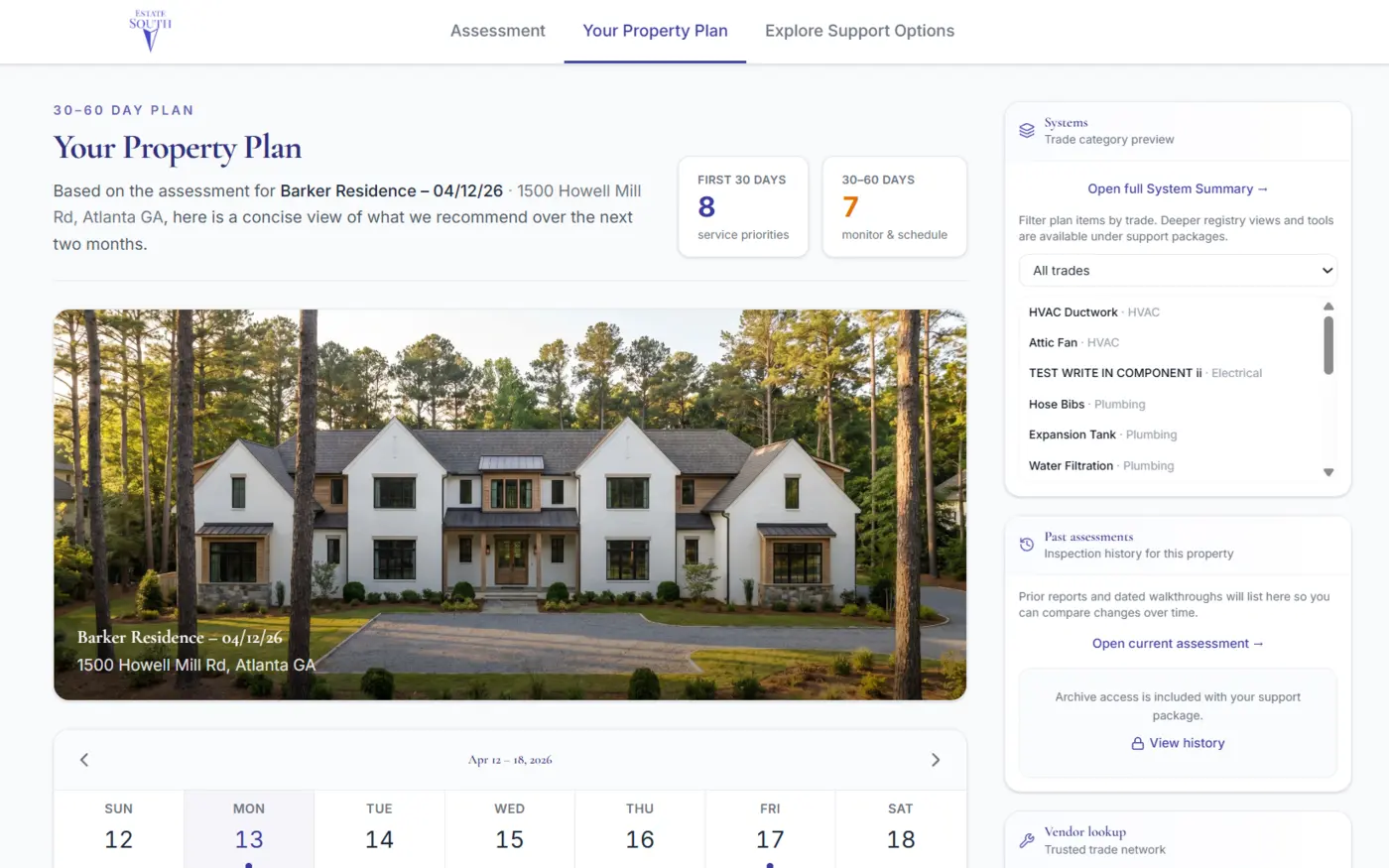
Full report — login prompted at the right moment. When the client tries to see the full report or explore deeper data, a sign-in step is introduced naturally. After login, the client sees a dashboard with:
- All property data organized by the Property → Structures → Areas → Components hierarchy
- A triage view of the first four to eight weeks: what needs immediate attention
- Condition flags from the assessment
Service request triggers package discovery. When a client clicks an item flagged as needing service and selects "request service," a prompt appears: this capability is part of the support packages. A link to explore support packages appears at the top of the dashboard.
Maintenance plan. Before selecting a package, the client can review the maintenance plan generated from the assessment data. This is where the maintenance intelligence layer becomes visible to the client: component types, known service intervals, and recommended priorities, assembled into a structured plan rather than a list of concerns.
Support package selection. The package explorer takes the client through a brief scope-sizing flow: light, medium, or heavy operational needs. From that selection, a package appears with a base price. The client can adjust add-ons — additional inspection visits, planning time blocks, project management hours — and see pricing update live. The goal is for the client to feel in control of the scope, not presented with a take-it-or-leave-it number.
Approval, contract, and payment. When the client approves, a contract is generated automatically from the engagement scope and their property data. Signature happens in-browser. Payment follows. When payment is confirmed, the client's custom property dashboard activates.
The full path — from executive summary link to signed contract — can complete in a single client session.
Maintenance intelligence layer
Assessment data becomes a maintenance plan. This is the operational principle that separates a documented estate from a managed one.
The system draws on a component-type library: for a metal roof, a set of known service intervals exists. For gutters, for exterior stucco, for timber structures, for mechanical systems — each component category can carry base recommendations for inspection frequency, treatment timing, and seasonal concerns.
When an assessment is completed, the system can overlay these recommendations against the actual components recorded for the property, adjusted for condition ratings and any flagged concerns. The output is a structured maintenance plan — not a generic schedule, but one shaped by what was actually counted and assessed.
This library grows over time. The more component knowledge is accumulated across properties, the more useful future assessments and maintenance plans become. It is a data moat: structured property knowledge at component resolution, reviewed and refined by the team that manages the estates.
The intelligence layer is a support tool, not an autonomous decision-maker. Every maintenance plan recommendation is reviewable before it reaches a client.
Production and recurring operations
After a client activates, the production layer handles what gets done.
Recurring tasks are set up per property — the operational schedule that runs in the background of estate management. Tasks can be assigned, scheduled, and tracked without requiring staff to remember what is due.
Assessment flags become production tasks. Any component flagged during a field assessment can be pushed into the production system as a task, a quote request, or a service ticket. The link between the documented concern and the scheduled work is direct.
Homeowner-surfaced issues. Clients can flag issues through their dashboard. Staff receive those requests as production items, not emails to a shared inbox.
Quotes and approvals. Quotes for work can be pushed to the client through the platform. Approved quotes flow into the production schedule.
Payment and vendor management. The legal position of the business is that Estate South coordinates and executes approved maintenance plans — it does not hold client funds. Clients, family office staff, bookkeepers, or accountants can pay vendors directly. The platform provides the coordination layer, the documentation, and the visibility. An escrow model is also supported for clients who prefer it.
Client experience and visual detail
The client dashboard is designed to feel premium. High-end estate owners expect a digital experience that matches the quality of the service.
UI skin options — walnut interior, private-jet paneling, and similar high-end environment references — support the aesthetic positioning without requiring a custom design for every client. The skins are a supporting detail, not the product. The product is knowing the property, managing it well, and giving the client a clear window into what is being done.
What this pattern applies to
Any professional service business where the first deliverable is a detailed assessment or inventory — and where clients need to move from "here is what we found" to a signed engagement without the firm being the email relay at every step. Especially relevant for estate and property management, facility management, and high-touch residential services.
Technical details
Deployed as a pnpm monorepo with two distinct experiences from one codebase: internal staff OS and client portal, sharing one Supabase database with no cross-contamination between staff and client views.
Offline field assessment — service worker and local storage queue for capture during low-signal walkthroughs; sync notification on reconnect.
Engagement state machine — estimates, contracts, and activations hang off a formal lifecycle (draft through active) with an org-level audit trail on every transition.
Maintenance schedule generation — component classification table seeded with service-interval recommendations; reviewable before any client-facing output.
CRM intelligence pass — lead records enriched with Tavily research (property context, public news, valuation signals); always staff-reviewed.
Cross-app lead bridge — marketing site and staff shell share one database; server-to-server handoff triggers Klaviyo nurture from a single integration point.
Stack: Next.js 16, React 19, Supabase, OpenAI GPT-4o-mini (notes polish and classification support), Klaviyo, pnpm monorepo.
The property was always complex. The question was whether the system matched that complexity — or just described it after the fact.