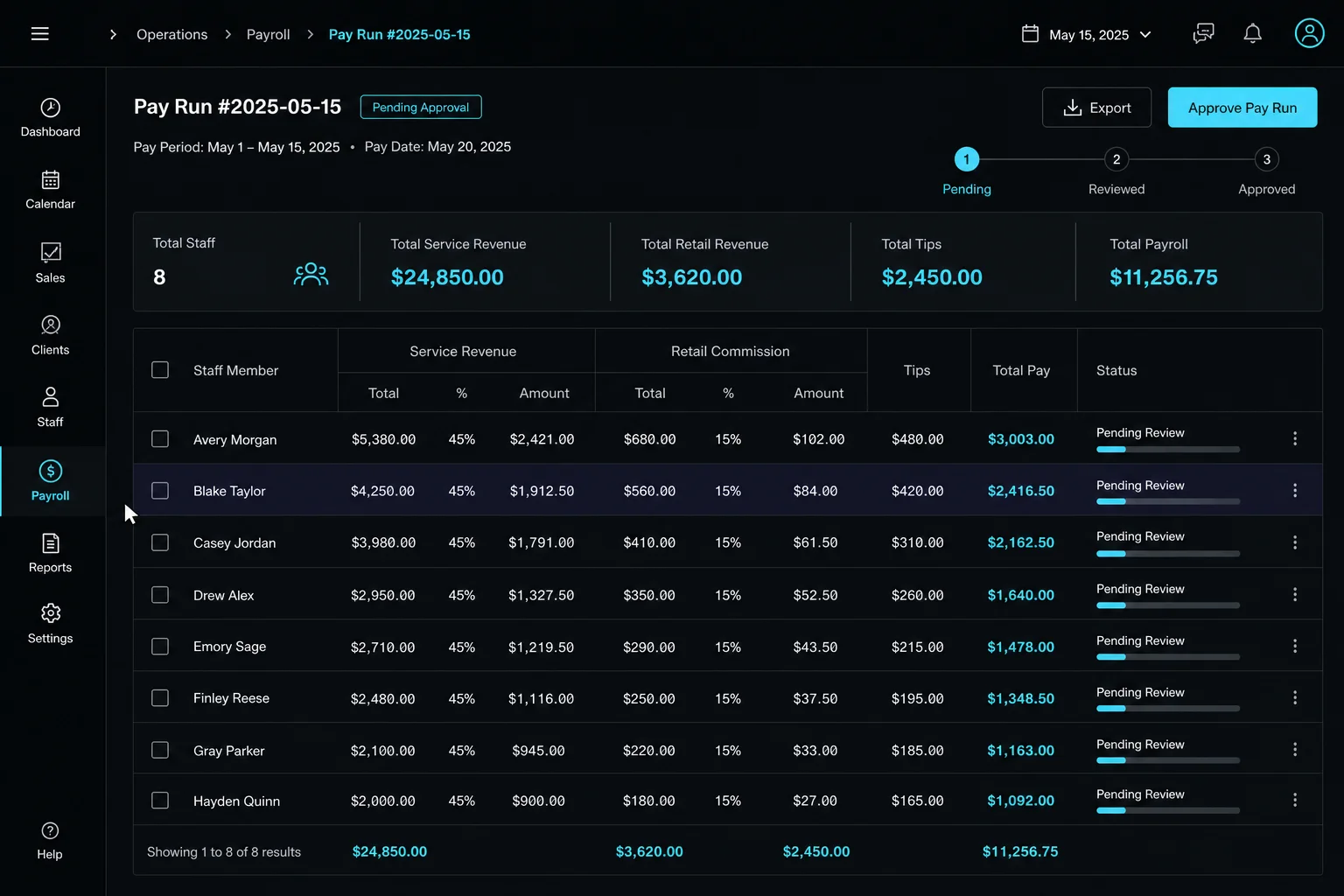
Part of the ASO Work App — the operating layer around a spa booking platform.
Where the payroll structure came from
Running a skincare spa with commission-based staff requires a compensation model that works for both sides. A newer esthetician still building a client base cannot reasonably be expected to risk pure commission — she needs a floor to make the role feel stable. But the business also needs her to grow, and commission upside is a meaningful incentive to do that.
The result is a structure where the practitioner earns whichever is greater — hourly or commission — plus retail and tips. If commission beats hourly, she earns commission. If it does not, she is protected by the floor. This structure makes sense operationally. It is also exactly the kind of conditional logic that booking platforms like Square and Boulevard do not support.
Platform payroll tools pay people the way the platform expects. They do not accommodate conditional math, custom discount handling, backbar deductions, or tiered retail bands shaped by how a specific business has decided to compensate its team.
Operational problem
Boulevard holds all the transaction data and produces it as a raw CSV export. That data is correct. What the business does with it still requires human interpretation at every step — and those steps add up.
The early payroll process looked like this:
Log into Boulevard. Filter the payroll report by week. Separately filter the time clock report. Export both. Open the spreadsheet. Separate each person's data manually. Copy service revenue into one calculation sheet. Apply net sales logic: subtract discretionary discounts, apply backbar before commission. Separate retail into a second calculation. Apply tiered commission bands. Pull tips separately. Add gratuity rounding. Run the hourly-or-commission conditional. Add everything. Check the math. Export to PDF. Edit the filename to the correct week. Email to the employee. Schedule the send for Wednesday morning. Then separately log into Gusto and process the actual payroll.
That is roughly 15 to 20 steps per person, per week. In the best-case scenario after months of refinement, the process still took 30 minutes. And every step was a failure point — a wrong paste, an overwritten formula, a misaligned date filter, a calculation that looked right but was not.
A half-built intermediate version used Airtable and JotForm to handle the form submission and output generation. It was better than a pure spreadsheet but still required uploading two separate Boulevard PDFs, cleaning up the output, deleting header rows from the generated document, and manually forwarding the email. It also meant the output lived in Jotform's hands rather than a Google Drive folder the business controlled.
What the engine does now
The ASO payroll workbench opens to the primary employee with the previous week already filtered. That is the first step — there is no setup, no date entry, no navigation. The right data is on screen.
The owner reviews each line: service revenue, retail, tips, and the conditional calculation that determines the final figure. Individual lines can be toggled with a documented reason if something needs to be excluded. Missing timeclock punches can be overridden with the reason recorded. Totals recalculate live.
When the numbers look right: one click to approve. That single approval:
- Saves the payroll document to Google Drive with the correct filename and date
- Schedules the employee email for Wednesday morning — the same morning pay deposits
- Preserves the full record in the platform for future reference
The practitioner receives a clean, mobile-friendly document she can open on her phone, read, and save. No app required.
The human-in-the-loop is intentional
A Gusto API integration could automate the payroll submission step entirely. It is technically straightforward. It has not been done, and that is deliberate.
Payroll is one of the highest-trust interactions between an employer and their team. Catching a problem before it reaches someone's paycheck is worth the few minutes of review. The approval step exists not because the system cannot be trusted, but because the consequences of a silent error are measured in trust, not just dollars.
The math did not change. The process did. And the human who presses approve still understands every line.
What the calculation covers
Net service revenue after discretionary discounts. Backbar costs deducted before commission. Tiered retail commission at 10% / 15% / 20% bands. Tips rounded to whole dollars to match the paper worksheet the business used for years. Total pay = the greater of hourly rate or commission, plus retail and tips, no double-stacking.
A golden test suite covers every edge case. Code changes that silently alter the paycheck math fail the build before they reach production.
What this pattern applies to
Any service business on a booking platform where payroll involves conditional tiers, tips, retail splits, or an hourly floor — and where the owner is still the spreadsheet between the POS and payday.
The pattern: replace fragile multi-step export-and-calculate processes with a system that has the data already, applies the right conditional logic, produces the same document every week, and keeps a human in the approval seat.
Technical details
Async Boulevard pipeline — Phase 1 (4:30am Monday): requests Boulevard GraphQL export, stores job ID. Phase 2 (4:45am): downloads ready CSV, upserts rows into Supabase. The two-phase approach is intentional — Boulevard exports are not instant.
Calculation engine — net service revenue after discretionary discounts, backbar before commission, tiered retail bands, tip rounding, total = higher of hourly or commission plus retail and tips. Covered by golden tests.
On approval: Google Drive save via API, Klaviyo-scheduled employee email with the payroll document attached.
Stack: Next.js 16, Supabase, Boulevard Admin API, pg_cron, TypeScript on Vercel.
The math was always right. What was wrong was everything around it — the fragility, the steps, and the time it cost every week.