Operational problem
This project started with a familiar problem in high-end residential construction: the owner had plenty of project data, but the data was trapped in too many places to be useful. The record included exports from the builder's project software, change orders, vendor invoices, receipts, pay applications, job logs, schedules, drawings, owner-paid expenses, and project emails. The information existed, but it was fragmented.
The builder's software could show pieces of the job. It did not give the owner the visibility needed to understand how money was flowing, what backup existed, how costs related to issue categories, or how field events lined up against the schedule and daily project record.
The owner needed his own data layer — independent of the builder's interface — to understand the project record. The attorney needed a cleaner review surface that did not require manually opening hundreds of PDFs or depending only on summary explanations. The construction consultant needed a way to organize the record, connect source documents, surface patterns, and track what still needed review.
What was built
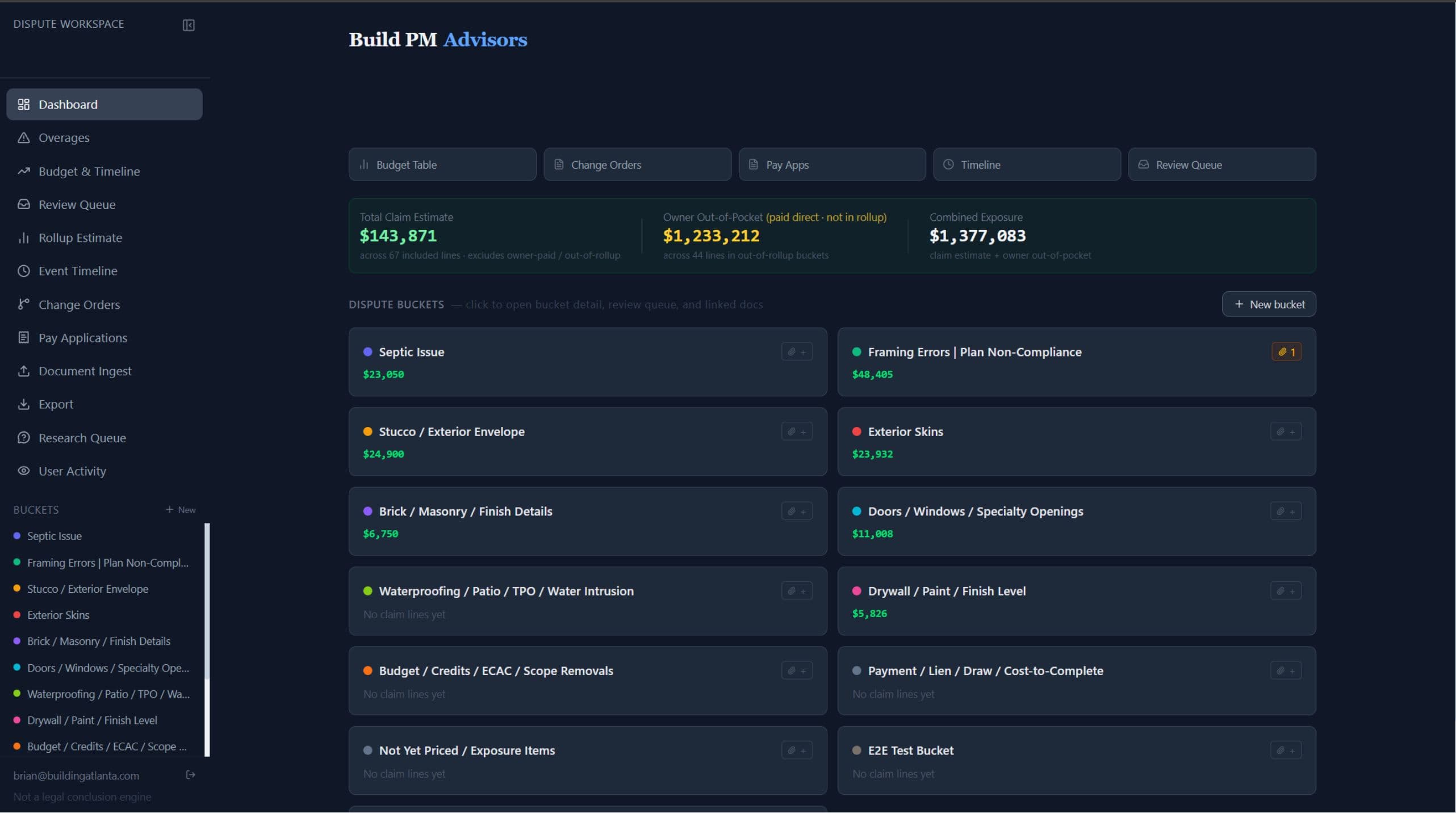
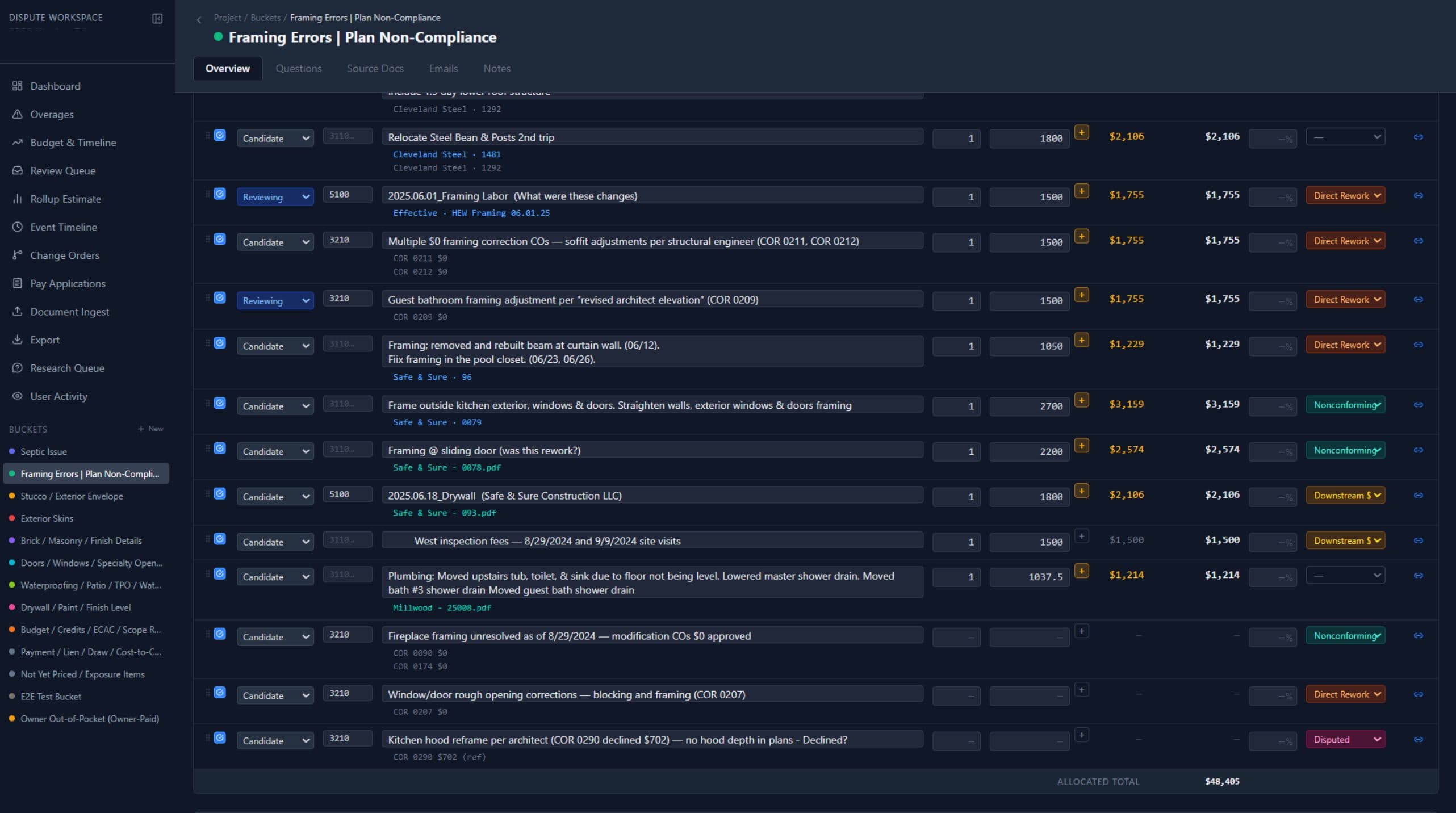
A custom dispute workspace was built around the project data. Exports from the builder's software, downloaded PDFs, vendor invoices, receipts, change orders, and related metadata were pulled into a Supabase-backed system with row-level security. Instead of leaving documents as disconnected files, the workspace converted them into structured records that could be searched, filtered, linked, and reviewed. Each record could connect to issue buckets, cost items, timeline events, source documents, and comments.
Getting the data out
The first real obstacle was the builder's software itself. Most construction management platforms — Buildertrend, Procore, CoConstruct, and the like — make you open and download documents one at a time, with no clean way to pull the whole record out at once. For a project with hundreds of invoices, receipts, change orders, and pay applications, manually downloading and filing all of it would have taken weeks and still left gaps.
So we automated it. Agents equipped with vision tools and scripts worked through the platform continuously — opening documents, downloading them, parsing the data inside each one, categorizing it, and populating the database. It ran on its own, working through the backlog far faster than a person clicking through screens record by record, and it kept the source file attached to every record it created.
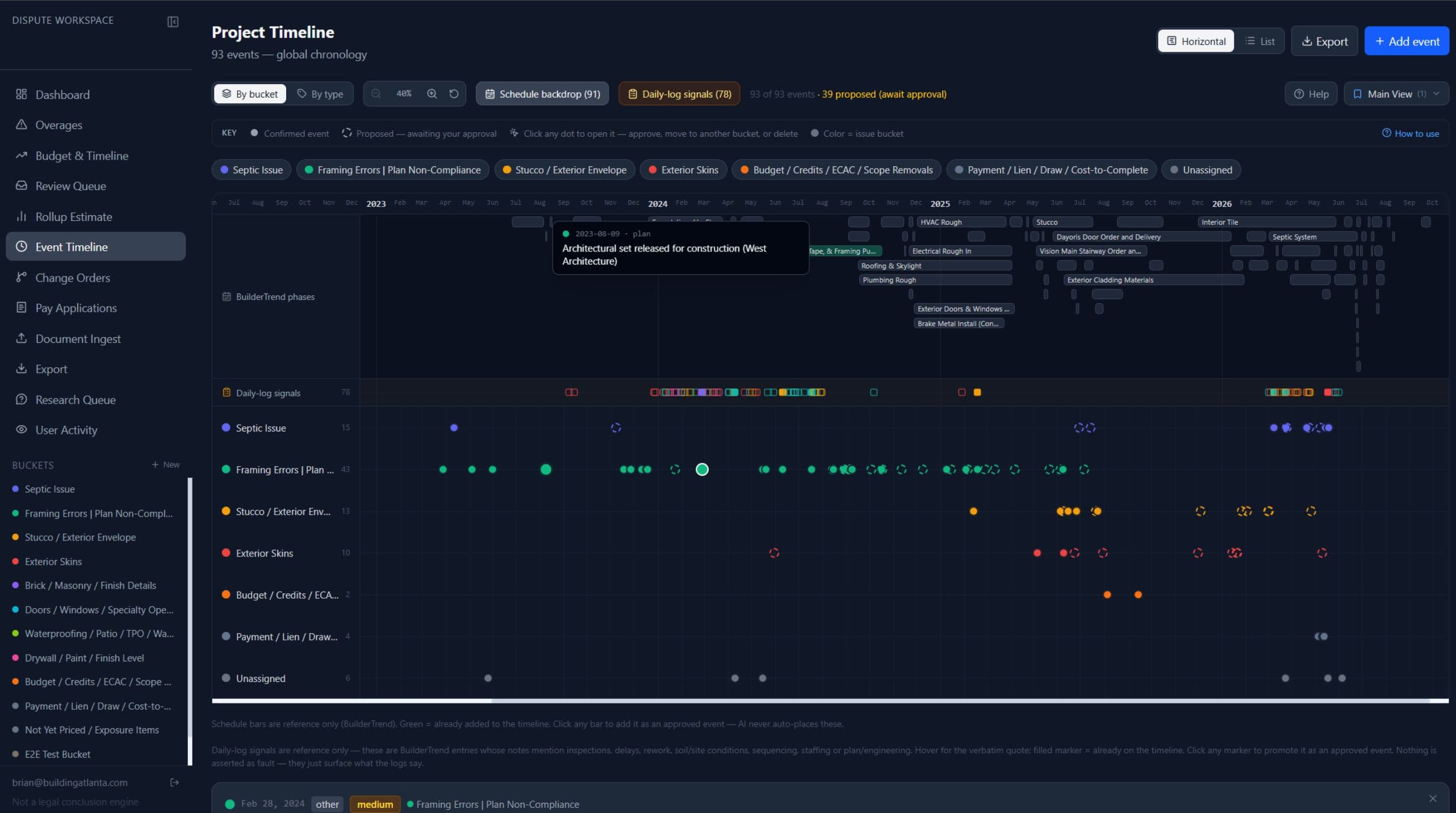
The builder's schedule was imported as its own layer. Daily job logs were scraped and overlaid against that schedule, and change orders, pay applications, and vendor invoices were tied into the same timeline. What had been a pile of disconnected exports became a single connected record where a cost, a document, a schedule phase, and a field event could all be seen in relation to each other.
The data sources are flexible too. Anything that carries project history can be brought in — builder exports, emails, bank and card statements, receipts, design files, and even transcripts pulled automatically from phone calls. If it tells part of the story, it can be parsed, categorized, and added to the same record as everything else.
The workspace organized the matter around construction issue buckets, and the structure is flexible — buckets are defined to fit whatever the project needs. In practice they might cover categories like site work, structural coordination, exterior systems, interior finishes, incomplete scope, owner-paid items, and anything else the dispute turns on, but those are examples rather than a fixed template. Each bucket holds relevant records, status, supporting backup, discussion, open questions, and timeline connections.
Rather than asking someone to search through builder software folders, email attachments, PDFs, and spreadsheets, the workspace let the team start with a high-level issue area and drill into the specific records behind it. A user could open an issue bucket, follow a related cost or claim line, and jump directly to the vendor invoice, receipt, change order, or supporting document tied to that line.
Source-linked review
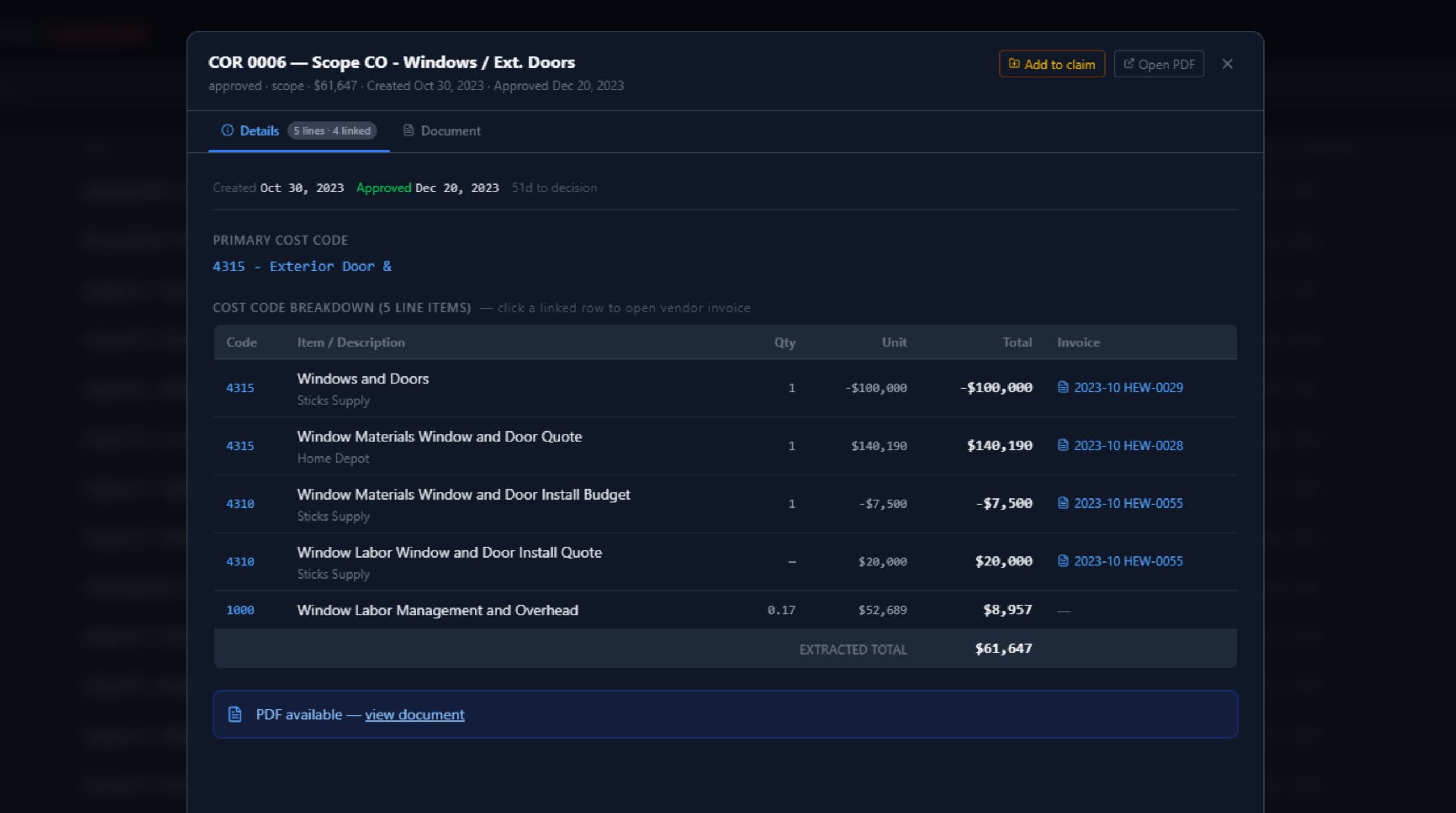
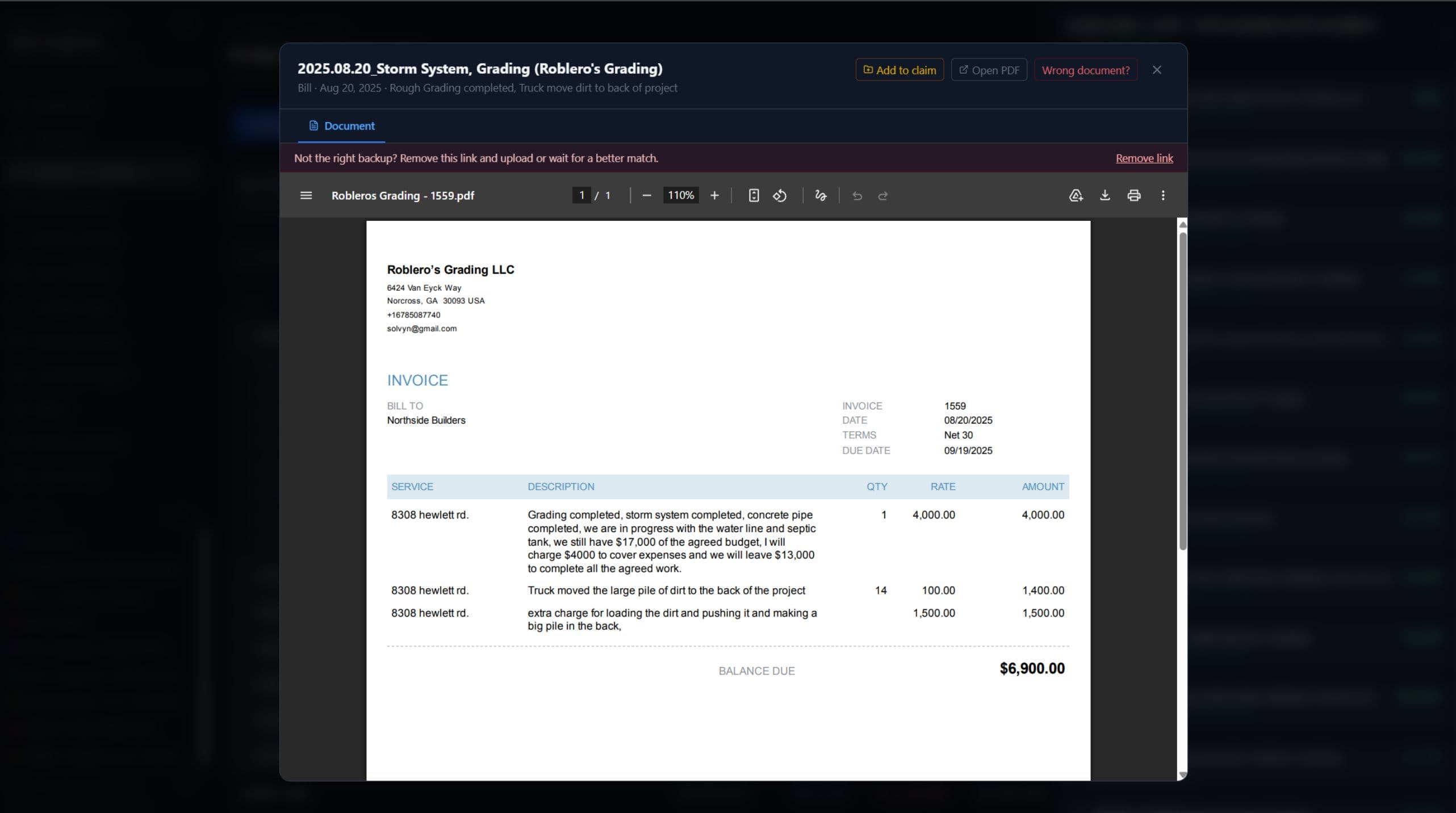
That direct document linking became one of the most useful features. The workspace made backup visible at the point of review. Costs, records, and narrative context stayed connected. A number was not just a spreadsheet entry — it could tie to the source document behind it.
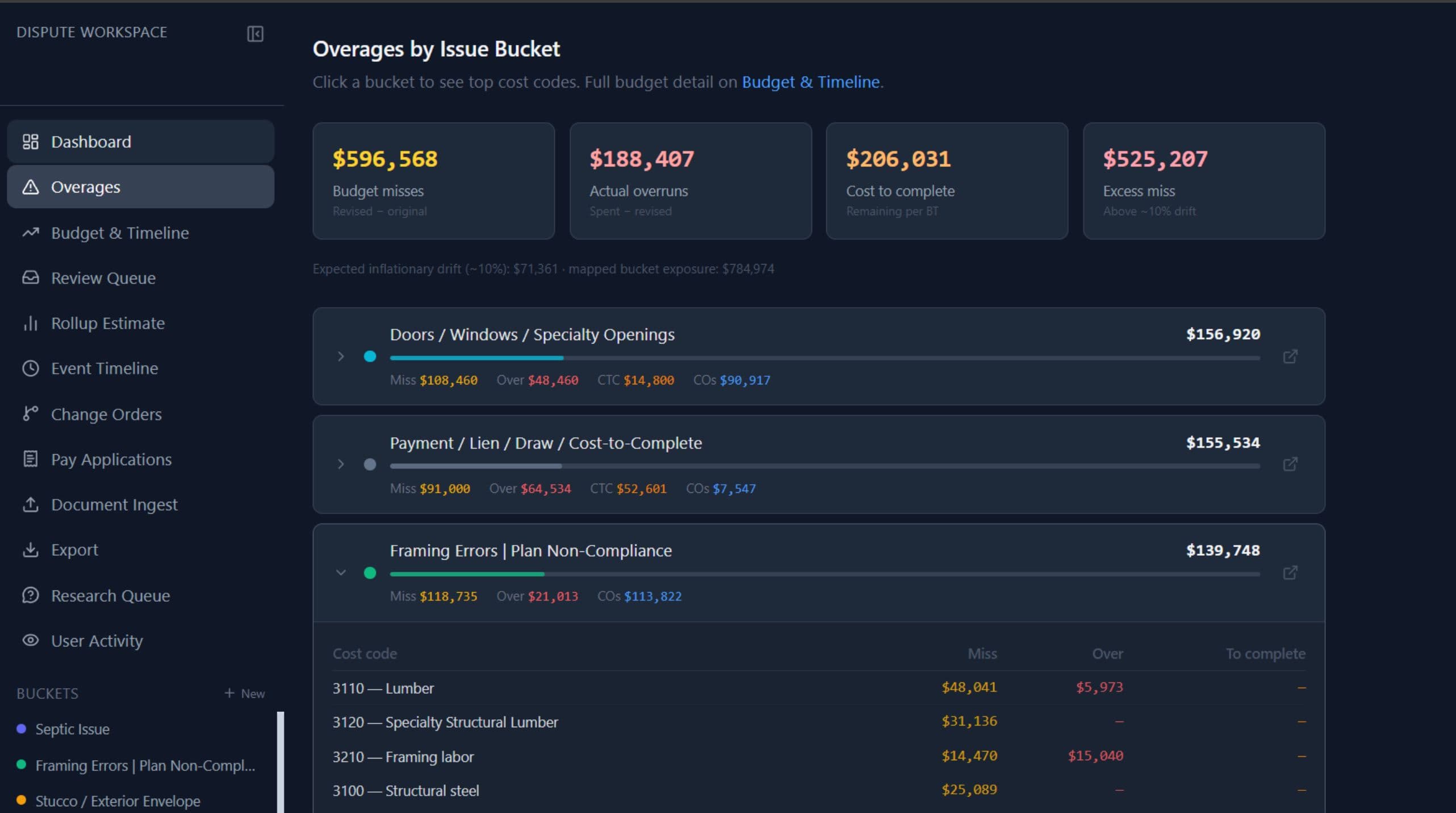
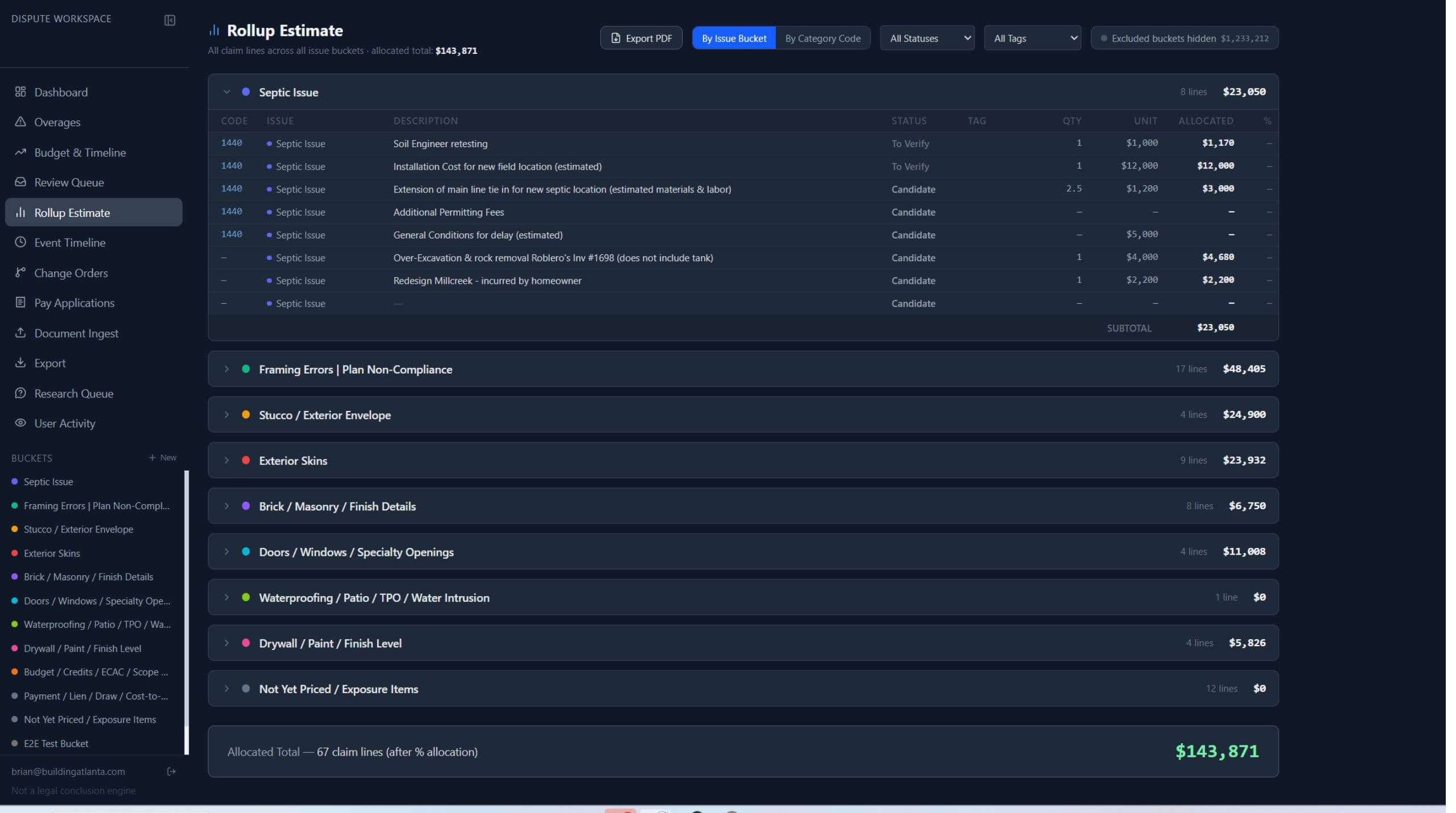
The linking went deeper than attaching a PDF to a line. The system modeled the money: budget miss, overrun, and cost-to-complete down to the individual cost code; contractor-fee and allocation logic carried on each claim line; owner-draw-to-vendor-invoice hierarchies with variance flags where the numbers did not reconcile. Even scanned, image-only invoices were read by vision and turned into searchable scope — so a figure on a claim line could always be opened back to the document that created it, including the ones that arrived as nothing but a photograph.
The workspace became a source-linked review environment where project data could be organized, questioned, and refined without losing the underlying backup.
An owner-side budget the builder did not control
A separate owner-paid section gave the owner a way to track every expense the builder's reporting did not — whether it was directly related to the dispute, incurred because of contractor error, or simply an owner-paid cost outside the builder's scope. Mitigation work, scope removed from the builder, shifted costs, duplicate exposure, design fees, consultants, materials bought direct: all of it could be captured in the same system as the rest of the record.
That mattered because the builder's platform only shows the builder's slice of the project. An owner trying to understand what the home actually cost has expenses living in their own bank statements, credit cards, and email — nowhere near the builder's budget. Bringing those records into the same workspace let the owner manage an overall budget across the whole project, not just the part the builder chose to report, and made the total financial burden visible in one place for the first time.
Timeline and job logs
A timeline layer reconstructed the sequence of project events. Timeline records connected to issue buckets, source documents, change orders, job logs, schedule items, and other project records. Job logs were scraped and converted into usable records that could be overlaid against the schedule and issue timeline — planned sequence, recorded site activity, field events, change-order activity, and issue development in one view. The logs came in rich, carrying weather, crew and location notes, and jobsite photos, so a given day either corroborated what was supposed to have happened or, by what it left out, showed where the contemporaneous record went quiet.
Gaps in contemporaneous documentation became visible. Periods with limited or missing job-log activity could be compared against the timing of known project events, corrections, or field issues. The system did not need to decide what those gaps meant. It made the pattern visible so the owner, attorney, and consultant could review the record with better context.
Drawings, email, and agents
The workspace collected and organized documents related to architectural revisions, structural sets, CAD requests, and coordination emails among the owner, builder, architect, and structural engineer. That made it easier to follow which drawing sets were issued, whether revisions were coordinated, who had access to CAD files, and whether shop or framing-related drawings were reviewed by the appropriate design professionals.
Email is part of the record too. Project-related messages can be extracted, parsed, tagged, and embedded so they join the same searchable layer as costs, drawings, job logs, and documents — indexed by topic, bucket, party, and timeline period rather than buried in a mailbox. That puts the correspondence on equal footing with everything else, which is what makes the next part possible.
Agents operate inside the environment to help organize and populate the data, but not as final decision-makers. AI-assisted workflows help ingest records, classify documents, populate timeline entries, suggest relationships, summarize source material, and surface patterns that would be difficult to see manually. These assists are optional and tunable to each project's tolerance for noise — they propose, they do not decide. The human team remains responsible for review, judgment, acceptance, and final use.
Ask the entire record a question
The real payoff of pulling everything into one place is that the project becomes answerable. Once costs, change orders, invoices, emails, drawings, daily logs, and transcripts live in one structured database, no one has to dig through folders to find out what happened. They ask.
Semantic search lets a user pose a question in plain language — who first raised a concern about a given system, when a decision was made, whether an issue surfaced before the work proceeded, how a cost lines up against the schedule — and get an answer back with the source citations behind it. The model has effectively read every page of the record, and each answer points to the specific emails, invoices, logs, or documents it came from, so nothing has to be taken on faith. The team reads the citation, not just the summary.
For an attorney or construction consultant staring down tens of thousands of pages, that is the difference between weeks of manual reading and an afternoon of targeted questions. The review still happens and a person still decides what holds up, but the record is finally reachable. Questions that used to be impractical to ask — because answering them meant opening hundreds of documents by hand — become a normal part of working the file.
And because the full record is structured and accessible, the intelligence sitting on top of it is open-ended. The largest language models can be pointed at the whole picture through API access, and an owner or counsel can just as easily aim their own agents or frontier models at the same data to chase a theory the base platform never anticipated. The data layer is the asset; what you ask of it is yours to extend.
Stakeholder access, comments, and verification
The platform runs on Supabase with row-level security. Each stakeholder — owner, attorney, consultant — can be given their own secure login with access scoped to what they need. They do not share one generic account or one flat folder of PDFs.
Each issue and line item has a comments thread. As records move through the workspace, the team can discuss specific items in context instead of scattering notes across email. Comments stay attached to the record they refer to.
Status fields and structured workflow preserve the review boundary. Items can remain pending, be marked for investigation, accepted, rejected, or moved toward attorney-ready review. The system holds both source data and work-in-progress analysis. The purpose is not to treat every surfaced issue as final. The purpose is to separate raw records, candidate findings, verified items, and attorney-facing material as they move through verification steps.
That boundary applies to machine output too. An AI-assisted answer or a suggested connection enters the system as a candidate, not a conclusion — it carries the same draft, needs-review, and accepted states as everything else, and only becomes a claim figure when a person signs off on it. The line between raw record, candidate finding, and attorney-ready material is enforced by the workflow, not left to anyone's discipline. The work product always reflects human judgment rather than machine assertion.
What it surfaced
Once the record was connected, patterns showed up that were impossible to see in scattered files. Rework charged back to the client started to cluster — the same areas being paid for more than once, corrections billed as if they were new scope. Weak project controls became visible in the gaps: phases with little or no contemporaneous documentation lining up against the timing of known problems. And a broader lack of transparency came into focus, made easier by the way the builder's platform compartmentalized information so no single view ever showed the whole picture.
The workspace did not draw conclusions. It organized the record so the owner, attorney, and consultant could see those patterns clearly, trace each one back to its source documents, and decide what they meant. Surfacing and organizing the pattern is the work the software does; judgment stays with the people.
Once those patterns were visible, the workspace helped turn them into something usable. Related findings — rework, plan deviations, sequencing failures, incomplete scope, supervision gaps — could be grouped into a coherent narrative and exported as an attorney-ready packet in a single step, each item still carrying its status and its links back to source. Scattered events became a theory of the case the team could hand to counsel without rebuilding it by hand.
Practical result
The value is not instant answers. The value is clarity. A fragmented construction record becomes a structured review environment where the owner, attorney, and consultant can see the project more clearly, review supporting documents, search communications, understand how money moved through the job, and see where timeline, cost, documentation, and construction issues intersect — on an owner-side system the builder does not control.